Best Budget Laptops in Kenya for Students and Professionals (2026)
A laptop is probably the most important tool you’ll buy this year. If you’re a student, it’s where your notes, assignments, research and group projects live. If you’re a professional or freelancer, it’s your office, your meeting room and often your income.
The problem is the budget. A brand-new laptop that’s actually good costs a lot, and the cheap new ones are often slow from day one. That’s why so many smart buyers in Nairobi and across Kenya go for business-class laptops: the ThinkPads, EliteBooks, ProBooks and Latitudes that companies buy for staff, built to survive years of daily use, and available at a fraction of their original price.
This guide shows you what to look for, which models are worth your money, and how to avoid the common mistakes. Every laptop below is currently in our Computers collection, with real prices.
Why Business-Class Laptops Make Sense on a Budget
Budget buyers often compare a new entry-level laptop with a used business laptop. Here’s why the business laptop often wins:
Better build. Business models are designed for travel, daily carrying and heavy typing. Keyboards, hinges and chassis are tougher than those on cheap consumer laptops.
Better keyboards. You’ll type a lot. ThinkPad keyboards in particular have a loyal following for good reason.
Faster storage. Most come with an SSD, so the laptop boots and opens apps quickly.
More RAM. 8GB is common, and some models have 16GB or more, which budget new laptops rarely offer.
Useful security and ports. Fingerprint readers, HDMI, USB-A and more.
Easy to repair. Parts and repair skills are widely available in Kenya.
The trade-off is age. You’re buying a laptop that’s a few years old, so what you check before buying matters. We cover that below.
What to Look for in a Budget Laptop
Before looking at specific models, here’s what actually matters.
Processor generation. Look for at least a Core i5. Newer generations are faster and last longer in terms of software support. As a rule of thumb, 8th generation Intel (or newer) is a safe starting point in 2026, and we’ll explain why shortly.
8GB of RAM minimum. With 4GB, multiple browser tabs, Zoom and a document open at the same time will slow things down. 8GB is comfortable for most people, and 16GB is a bonus if you multitask heavily.
SSD storage. An SSD makes a bigger difference to everyday speed than almost any other part. 256GB is a good starting point for most students and professionals.
Screen size and quality. A 14 inch screen is a good balance for work and study. Compact 12 to 13 inch models are easier to carry, and Full HD screens are nicer to look at for long sessions.
Battery life. Used laptops often have some battery wear, so it’s worth asking about battery health and how long it lasts in real use.
Keyboard and ports. Check that every key works and that the ports you need (USB, HDMI, charging) are present.
Windows support. This one is easy to overlook, so let’s talk about it.
A Quick Word on Windows 11
Windows 10 has reached the end of its regular support, so most buyers today want a laptop that can run Windows 11. Windows 11 officially supports 8th generation Intel processors and newer, and AMD Ryzen 2000 series and newer.
That means laptops with 6th and 7th generation Intel chips can still work well for everyday tasks, but they can’t officially run Windows 11. If you want the longest useful life, aim for 8th generation Intel or newer. If budget is tight, an older model can still do the job, just go in knowing about this limit.
Current Deals on Budget Laptops
A few popular models are discounted in our collection right now:
Lenovo ThinkPad X280 at KES 26,000, down from KES 28,000
HP ProBook 440 G6 at KES 28,000, down from KES 32,000
Lenovo ThinkPad T495 at KES 35,000, down from KES 38,500
Deals change, so check the product page before you buy.
Best Budget Laptops in Kenya by Price
All prices below come from our current stock and can change.
Under KES 25,000: The Tightest Budgets
Lenovo ThinkPad Yoga 11e, Intel Celeron, 4GB RAM, 128GB SSD, Touchscreen X360: KES 15,000
The cheapest laptop in our collection. It’s a small 2-in-1 with a touchscreen that folds into tablet mode, which is handy for note-taking and reading. With a Celeron processor and 4GB of RAM, it’s built for light work: browsing, Google Docs, typing assignments and video lessons. It isn’t the one for heavy multitasking or demanding software.
Best for: First-year students and anyone who needs a light, affordable laptop for essential tasks.
HP ProBook 640 G2, Intel Core i5, 8GB RAM, 256GB SSD, 14": KES 23,999
A proper step up. A Core i5, 8GB of RAM and a 256GB SSD give you a laptop that handles everyday work comfortably, with a full-size 14 inch screen and keyboard. It’s an older generation, so keep the Windows 11 note in mind.
Best for: Students and office users who want solid everyday performance at a low price.
HP ProBook 640 G3, Core i5 7th Gen, 14", 8GB RAM, 256GB SSD: KES 24,500
Very similar to the G2 but a generation newer, for just KES 501 more. Same 8GB RAM and 256GB SSD, and a business-style design that’s easy to live with.
Best for: Buyers who want a straightforward, dependable work laptop under 25K.
KES 25,000 to 30,000: The Sweet Spot
Lenovo ThinkPad X280, Core i5 8th Gen, 12.5", 16GB RAM, 256GB SSD: KES 26,000
This is still the standout value pick, and it’s now cheaper. 16GB of RAM at this price is rare, and an 8th generation processor means it can run Windows 11. The 12.5 inch screen makes it small and light for carrying around campus or to meetings.
Best for: Students and professionals who multitask a lot and want a compact laptop.
HP ProBook 440 G6, 8th Gen Intel Core i5, 8GB RAM, 256GB SSD, 14": KES 28,000
New in our collection and now discounted from KES 32,000. It pairs an 8th generation Core i5 with 8GB of RAM and a 256GB SSD, so it can run Windows 11 and handle everyday study and office work easily. It’s a good pick if you want a modern processor under 30K but prefer a regular 14 inch screen to a compact one.
Best for: Students and office users who want an 8th generation laptop with a full-size screen.
Lenovo ThinkPad T480s, 14" FHD IPS, Core i5-8250U, 8GB RAM, 256GB SSD, Windows 11: KES 29,500
A slim, well-built 14 inch ThinkPad with a Full HD IPS screen, which looks clearer and sharper than the basic screens on many budget laptops. It comes with Windows 11, and it’s a favourite for people who type a lot.
Best for: Professionals and serious students who want a great keyboard and a nicer display, still under 30K.
KES 30,000 to 40,000: A Step Up in Performance
HP EliteBook 830 G6, 8th Gen Intel Core i5, 8GB RAM, 256GB SSD: from KES 31,000
A compact, professional-looking laptop that’s easy to carry. Its 8th generation Core i5 can run Windows 11, and the EliteBook design suits client meetings and presentations. We list this model more than once, so you’ll see slightly different prices, and the other EliteBook 830 G6 listing is KES 32,000.
Best for: Professionals who want a neat, portable work laptop.
HP ProBook 640 G4, 8th Gen Intel Core i5, 8GB RAM, 256GB SSD, 14": from KES 32,500
A newer, 8th generation step up from the ProBook 640 G3, with a Core i5-8365U, 8GB of DDR4 RAM and a 256GB SSD. It runs Windows 11 and suits long study sessions and office work. There’s a second listing at KES 34,500, so compare the two and ask us what the difference is.
Best for: Buyers who want a dependable 14 inch work laptop with Windows 11 support.
Lenovo ThinkPad T495, AMD Ryzen 5 PRO, 14", 8GB RAM, 256GB SSD: KES 35,000 (was KES 38,500)
A good option if you prefer AMD. The Ryzen 5 PRO is a capable processor for multitasking, and the 14 inch display gives you room to work. It’s now discounted by about 9%.
Best for: Multitaskers who want strong all-round performance.
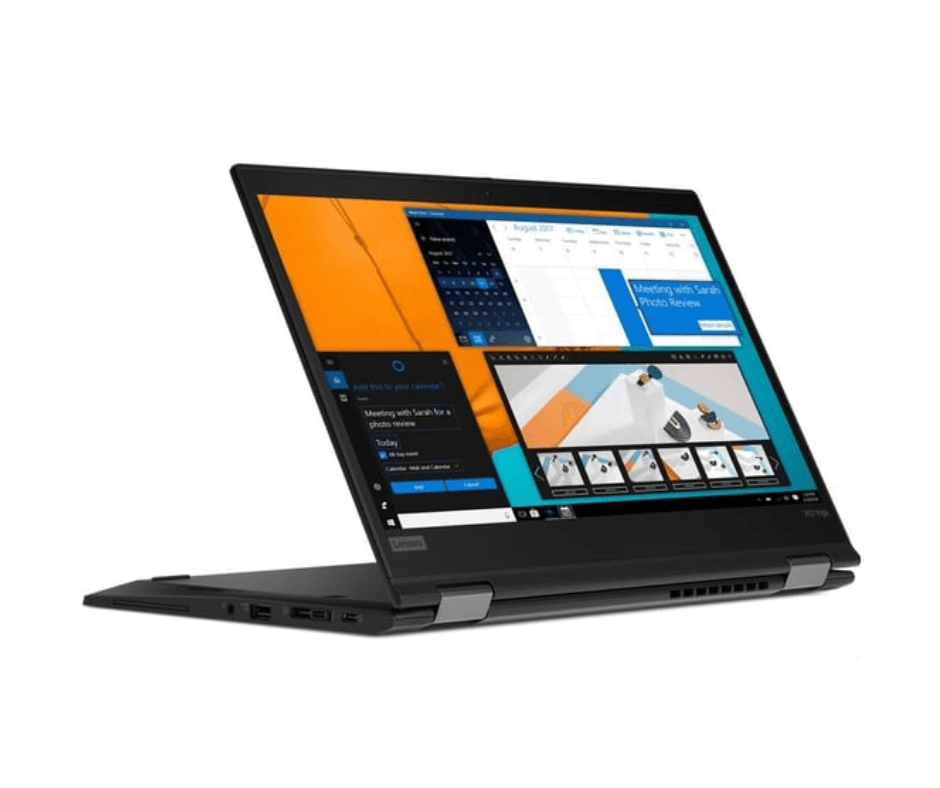
Lenovo ThinkPad X13 Yoga Gen 2, Core i5-1185G7, 8GB DDR4 RAM, 256GB: KES 35,000
An 11th generation processor in a flexible 2-in-1 body. You can use it as a laptop, fold it into tablet mode or prop it up for presentations. It’s the most modern processor in this price range.
Best for: Students and professionals who want a newer, faster laptop that can also work as a tablet.
Dell Latitude 7410, Core i5 10th Gen, 14", 8GB RAM, 256GB SSD: KES 38,000
A premium business laptop from Dell, with a 10th generation processor and a solid build. A good pick if you like the Latitude line or want something a little more modern than the 8th generation models.
Best for: Professionals who want a refined, durable Dell.
Premium Picks: For Those Who Can Stretch
HP EliteBook 830 G8, Core i5 11th Gen, 13.3" FHD, 8GB RAM, 256GB SSD: KES 49,000
A compact laptop with an 11th generation processor and a Full HD screen in a 13.3 inch body. If you want a laptop that will stay current for years and you can stretch your budget, this is a strong place to start.
Best for: Professionals and long-term buyers who want a modern, portable option.
HP EliteBook 1030 G7 x360, Core i7-10310U, 16GB RAM, 512GB SSD, 13.3" Touchscreen: KES 62,500
A high-end 2-in-1 with a Core i7, 16GB of RAM, a roomy 512GB SSD and a 13.3 inch touchscreen that folds into tablet mode. The listing describes it as certified refurbished Ex-UK with a 6 month warranty, which is a real plus at this price. A good choice for professionals who travel and present a lot.
Best for: Professionals who want a premium, convertible laptop with warranty cover.
HP EliteBook x360 1040 G8, Core i7 11th Gen, 16GB RAM, 512GB SSD, 14": KES 68,500
A newer, more powerful convertible with an 11th generation Core i7, 16GB of RAM and 512GB of storage, on a 14 inch screen. It’s built for demanding multitasking, long workdays and travel.
Best for: Professionals and power users who want top performance in a flexible design.
HP EliteBook 830 G8 x360, Core i7 11th Gen, 32GB RAM, 512GB SSD, 13.3" Touchscreen: KES 69,500
The most powerful laptop in our collection, with 32GB of RAM, an 11th generation Core i7 and 512GB of storage. It’s more than most students need, but it’s a strong match for heavy multitasking, large files and long-term use.
Best for: Professionals and creators who need maximum memory and speed.
Which Laptop Is Right for You?
Here’s a quick way to decide, without needing a comparison chart.
If you’re a first-year student on a tight budget, the ThinkPad Yoga 11e at KES 15,000 handles the basics, or the ProBook 640 G2 at KES 23,999 gives you more power for not much more.
If you want the best value for money, the ThinkPad X280 at KES 26,000 is hard to beat, thanks to 16GB of RAM and Windows 11 support.
If you want Windows 11 support and a full-size screen under 30K, the ProBook 440 G6 at KES 28,000 is worth a close look.
If you type all day, pick a ThinkPad, and the T480s is a great place to start.
If you attend client meetings, the EliteBook 830 G6 or G8 looks professional and travels easily.
If you want a laptop that doubles as a tablet, the ThinkPad X13 Yoga Gen 2, the EliteBook x360 models or the Yoga 11e all fold over.
If you prefer a big, comfortable screen, go for a 14 inch model like the T480s, T495, ProBook or Latitude.
If longevity matters most, choose an 8th generation processor or newer so you can run Windows 11.
If you want warranty peace of mind at a premium level, the EliteBook 1030 G7 x360 listing mentions a 6 month warranty.
Laptops for Different Uses
For university and college students. Prioritise battery life, weight and a decent keyboard. Compact models like the X280 are easy to carry between lectures, and 8GB or more of RAM keeps note-taking apps, browsers and video calls running smoothly.
For remote workers and freelancers. You need reliability above all. A good keyboard, a clear screen, a webcam that works and enough RAM for video calls and multiple tabs. The T480s, T495, ProBook 640 G4 and EliteBook options all fit.
For office professionals. Look for a professional design and security features such as a fingerprint reader. EliteBooks and Latitudes are popular for this.
For light users and parents buying for kids. The Yoga 11e is simple, affordable and touch-friendly.
For heavier work like design or video editing. Budget business laptops can handle light creative work, but demanding tasks need more power. The Core i7 models with 16GB or 32GB of RAM in our premium range are better suited. Talk to us about what you plan to run.
What to Check Before You Buy a Used or Refurbished Laptop
A good laptop at a good price can still turn into a bad purchase if you skip the checks. Before you pay, go through this list.
Test the keyboard. Press every key and check the trackpad and its buttons.
Check the screen. Look for dead pixels, dark patches, scratches and uneven brightness.
Look at battery health. Ask how long it lasts and whether it holds a charge.
Test the ports. Plug in a USB device, HDMI cable and charger.
Check the camera, microphone and speakers. You’ll need these for online classes and meetings.
Confirm the specs. Check the processor, RAM and storage in Windows settings, not just on the sticker.
Check Windows activation. Make sure Windows is properly installed and activated.
Listen and feel. Loud fan noise or very hot surfaces can point to problems.
Ask about the warranty. Get the terms in writing, and be cautious if a seller can’t explain them.
Buy from a proper shop. A real store with an address, a phone number and a return process is far safer than a random online seller.
If you’re also thinking about used phones, our guide to Ex-UK vs Ex-USA vs refurbished vs brand new phones explains what those terms mean, and the same thinking about condition and warranty applies to laptops.
Common Mistakes Budget Laptop Buyers Make
Buying too little RAM. 4GB is fine for basic tasks, but many people regret it once they start multitasking. If you can, aim for 8GB.
Ignoring the processor generation. Older chips can’t run Windows 11 and may stop getting some updates sooner.
Choosing by looks alone. A laptop can look clean and still have a weak battery or a worn keyboard. Test it.
Skipping the warranty. Always know what happens if something goes wrong in the first weeks.
Forgetting accessories. A laptop bag, a mouse and a charger backup make daily life easier. See our computer accessories.
Overspending on power you don’t need. A student writing essays doesn’t need the same machine as a video editor.
Don’t Forget the Extras
A few additions can make your setup much better:
A monitor if you’ll work at a desk, for a bigger and more comfortable screen. See our monitors.
A mouse and keyboard for long sessions.
A laptop bag or sleeve to protect your investment.
A cleaning kit to keep your screen and keyboard fresh. We stock the Handboss Universal Foam Cleaner for KES 300.
A backup drive or cloud storage so your assignments and work files are safe.
Browse more in our computer accessories section. If you prefer a desktop setup, we also have system units.
Frequently Asked Questions
What is the best budget laptop in Kenya for students?
For most students, the Lenovo ThinkPad X280 at KES 26,000 is a strong pick, with 16GB of RAM, an 8th generation processor and a compact, light body. If your budget is under 25K, the HP ProBook 640 G2 or G3 offers a Core i5, 8GB of RAM and a 256GB SSD.
What is the cheapest laptop I can buy in Kenya?
In our current stock, the Lenovo ThinkPad Yoga 11e is the cheapest at KES 15,000. It’s a good option for light tasks like browsing, typing and online lessons.
Can I get a good laptop for under KES 30,000?
Yes. In our collection, options under KES 30,000 include the ProBook 640 G2 and G3, the ThinkPad X280, the ProBook 440 G6 and the ThinkPad T480s, all with Core i5 processors and 256GB SSDs.
Is a ThinkPad or an EliteBook better?
Both are excellent business laptops. ThinkPads are famous for their keyboards and durability, while EliteBooks are known for their sleek, professional look. The best choice depends on your priorities and budget.
How much RAM do I need?
8GB is comfortable for most students and professionals. 4GB works for light use, and 16GB is helpful if you multitask heavily or run demanding programs.
Can these laptops run Windows 11?
Laptops with 8th generation Intel processors or newer (and many Ryzen models) can. Older 6th and 7th generation models, such as the ProBook 640 G2 and G3, can’t officially run Windows 11 but still work for everyday tasks.
Do any of your laptops come with a warranty?
The listing for the EliteBook 1030 G7 x360 mentions a 6 month warranty. For any other laptop, ask us for the warranty terms before you pay.
Are used and refurbished laptops reliable?
They can be, especially business-class models, as long as you buy from a trustworthy seller and check the laptop properly. Always confirm the warranty terms before you pay.
Do you deliver outside Nairobi?
Yes, we deliver countrywide.
Can I see the laptop before buying?
Yes. You’re welcome to visit us at Kenya Cinema Plaza, Moi Avenue, Shop 3-1C in Nairobi and check the laptop in person.
How do I know which laptop suits my course or job?
Tell us what you’ll be doing, such as writing, coding, accounting, design or video calls, and we’ll recommend the right model for the work and your budget.
The Bottom Line
You don’t need to spend a fortune to get a laptop that works hard for you. Business-class laptops like ThinkPads, EliteBooks, ProBooks and Latitudes give you build quality, great keyboards and fast SSD performance at prices that suit student and professional budgets.
The simplest approach is to set your budget, aim for 8GB of RAM and an SSD, choose an 8th generation processor or newer if you can, and always check the laptop before you pay.
Ready to pick yours? Browse our full Computers collection, or go straight to our laptops. Not sure which one fits? Call or WhatsApp us on +254724368347, tell us your budget and what you’ll use it for, and we’ll point you to the right one. No pressure, no upselling. You can also visit us at Kenya Cinema Plaza, Moi Avenue, Shop 3-1C, Nairobi, and we deliver countrywide.
Related reading: Computers collection · Laptops · Monitors · Computer accessories · Talisa Tech News